



If you need to extend your term of storage, you can do so through our website or by contacting our customer service team.
Website – My Account Screen
- Navigate to the My Account screen by clicking on the My Account or Log In button in the upper right corner of seattlespermbank.com website.
- On the My Account screen, click on the Storage button or navigate down the screen to the Vial Storage
- Under Vial Storage, your current Storage End Date will be displayed. This is the date your current storage will expire.
- To extend storage, select the storage product you would like to purchase from the Add Storage drop down box. Upon selecting a storage product, your new storage Expiration Date will be calculated.
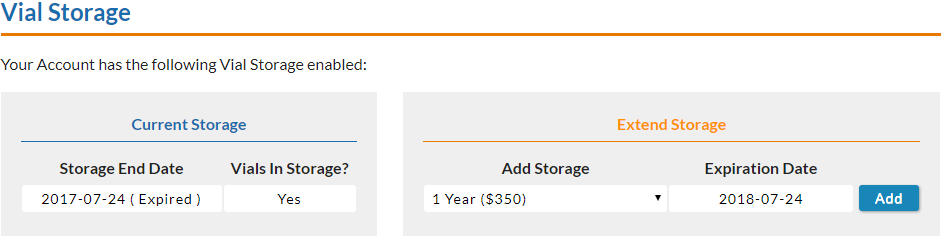
- Click on the Add button to purchase the storage product and proceed to the Delivery & Payment
- Enter your Customer Information.
- The Review Items section near the bottom of the screen will list your selected Vial Storage product and list the total cost.
- Enter your Payment Method and click on Complete Purchase.
Customer Service
Our customer service team is happy to assist you with extending your storage. Please contact them between business hours to add an additional term of storage to your account.